sRGB vs Adobe RGB
Mastering colour spaces is essential to ensure accurate and consistent colour representation across different media. The choice between sRGB and Adobe RGB depends on the intended use of the images, particularly whether they will be used digitally or in print.
What is a colour space?
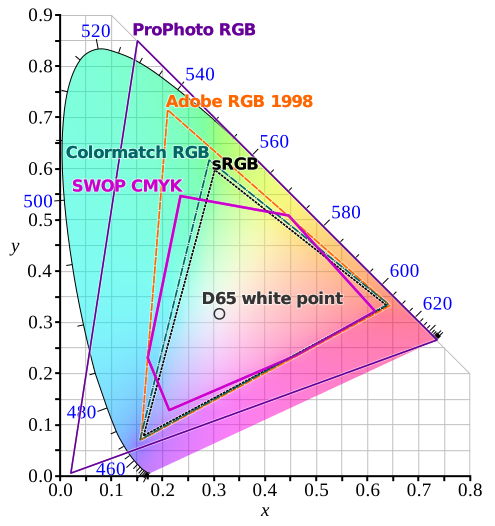
A colour space (or working space) defines how colours are displayed on screen and converted for printing. This can be compared to an image printed on a balloon: when the balloon is inflated, the colours expand, changing their appearance. This ability to stretch colours is called the colour gamut or chromatic range.
The most common spaces are sRGB and Adobe RGB (1998), used from the moment the image is captured, often by default in sRGB but with an Adobe RGB option on some devices.
Understanding sRGB
- Developed in 1996 by Microsoft and HP.
- The “s” stands for “standard”, RGB = red/green/blue.
- Standard for most cameras and screens.
- Allows approximately 97% of captured colours to be displayed.
- Has become the benchmark for the web and social media.
- Offers almost perfect visual consistency across all screens.
- Limited for printing as its palette is more restricted than that of Adobe RGB.
Understanding Adobe RGB (1998)
- Created by Adobe Systems in 1998 to better match CMYK (Cyan, Magenta, Yellow, Black) print colours.
- Palette approximately 35% wider than sRGB.
- Allows for better representation of greens and blues.
- Compatible with professional inkjet printers with 6 or more ink cartridges.
- Only 76% of Adobe RGB colours can be displayed on a standard sRGB monitor.
- Requires an Adobe RGB-compatible screen for accurate display
Main differences between sRGB and Adobe RGB
| sRGB | Adobe RGB (1998) |
|---|---|
| Perfect for the web and digital images | Best for printed images |
| Default workspace for DSLRs* | Option available in the camera settings* |
| Acceptable colour rendering for printing | Improves sharpness and punch of prints |
| More limited colour palette | Extends the colour range |
| Suitable for the web/social media | Less suitable for the web |
* DSLR = Digital Single-Lens Reflex
Visually, Adobe RGB prints show more vivid colours and better contrast than sRGB prints.
Choosing the right colour space for printing
- Converting an image to Adobe RGB for printing can be advantageous but is not always recommended.
- For the web, images must be encoded in sRGB.
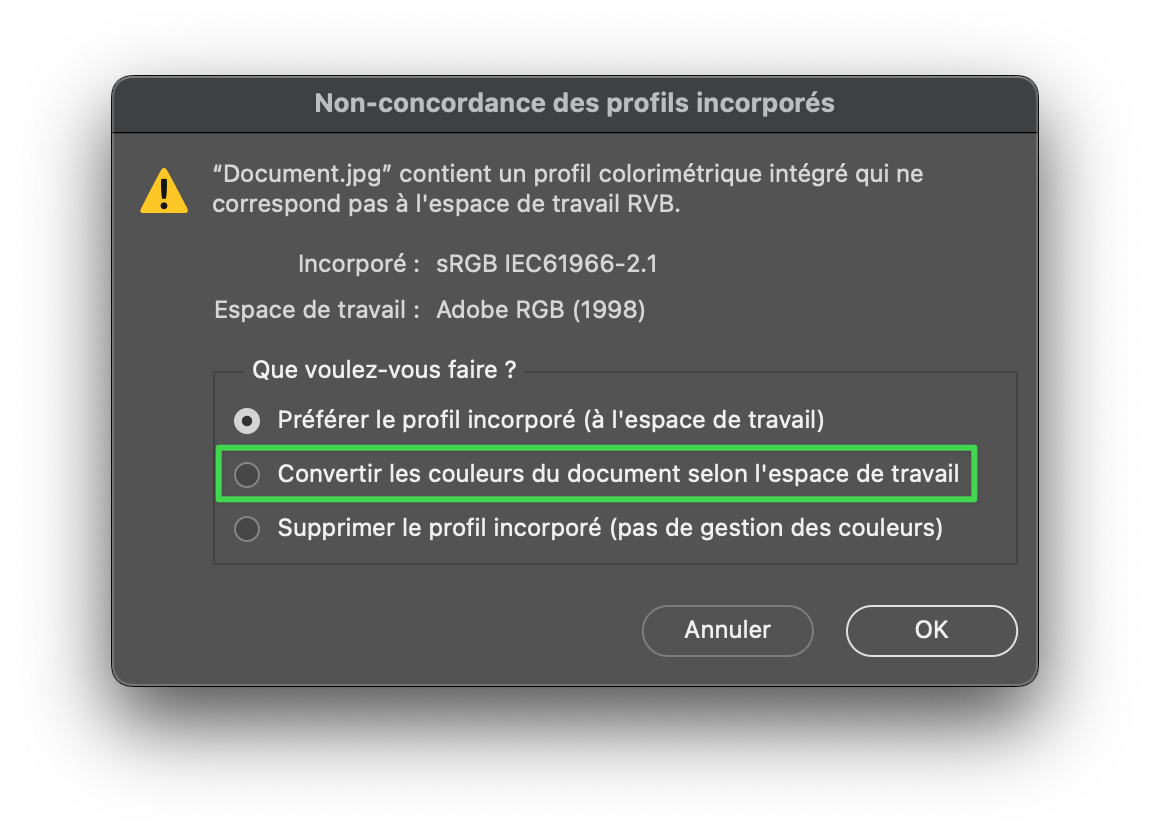
- Converting from Adobe RGB to sRGB can reduce the brightness and colours perceived on screen.
- Black and white images are not significantly affected by these spaces when printing.
Common misconceptions and best practices
- No colour space is objectively superior; they serve different purposes.
- Colour space conversion can result in a loss of colour information, but this is often imperceptible to the naked eye.
- When presented side by side, the differences may be visible, but not in isolation.
- Software such as Adobe Lightroom also uses spaces such as ProPhoto RGB, which has an even wider palette, but is not compatible with standard inkjet printing.
- Photoshop allows you to choose between sRGB and Adobe RGB when importing.
In summary
- sRGB is preferred for online publishing to ensure consistency.
- Adobe RGB is recommended for printing to take advantage of a wider colour gamut.
- Capturing in Adobe RGB and then converting to sRGB for the web is good practice.
- Experimenting is still the best way to understand the impact on your images.